Tracking Automation
Govern what gets automated, what must pause for approval, and what needs monitoring after publish.
This hub turns the final framework layer into a controlled workflow: build clean UTMs, validate before publish, check redirects, log what changed, pause high-risk actions for review, and keep monitoring outputs after launch.
The control layer for repeatable execution
Tracking Automation is not where teams decide strategy. It is where they apply already-governed rules consistently across UTM creation, QA, redirect validation, approvals, logging, and monitoring. The point is to remove repeated manual mistakes without automating away judgement.
Stable execution
Use automation when the workflow is predictable and the rule already exists.
- UTM build templates and parameter defaults
- Pre-publish QA checks for format and missing fields
- Redirect checks, link logging, and post-publish monitors
Human control points
Pause automation when commercial risk, ambiguity, or exceptions appear.
- Promotions, launches, and route changes with real spend behind them
- Unusual naming, conflicting inputs, or unknown ownership
- Attribution claims that need real interpretation
Judgement-heavy decisions
Automation should not invent the rules that the workflow is supposed to apply.
- Campaign strategy, reporting meaning, and escalation logic
- Source-of-truth decisions across systems
- Context-heavy exceptions that change the decision path
Choose the part of the workflow that still breaks
Automation only helps when the surrounding rule set is already trustworthy. Use this map to fix the weak layer first instead of automating around it.
Rules are still inconsistent
Clarify naming, ownership, and governance before trying to scale the workflow.
Fix UTM rules first → Strengthen governance →You need safer QA before launch
Add repeatable validation and redirect checks close to execution so bad assets do not spread.
Automate QA workflow → Open UTM QA Checker →The numbers still need interpretation
When systems disagree, do not let workflow automation pretend it solved a reporting problem. If the gap comes from how events are collected, step into server-side vs client-side tracking before you automate anything else.
Review cross-platform attribution → Compare disagreement patterns →The governed workflow for tracking operations
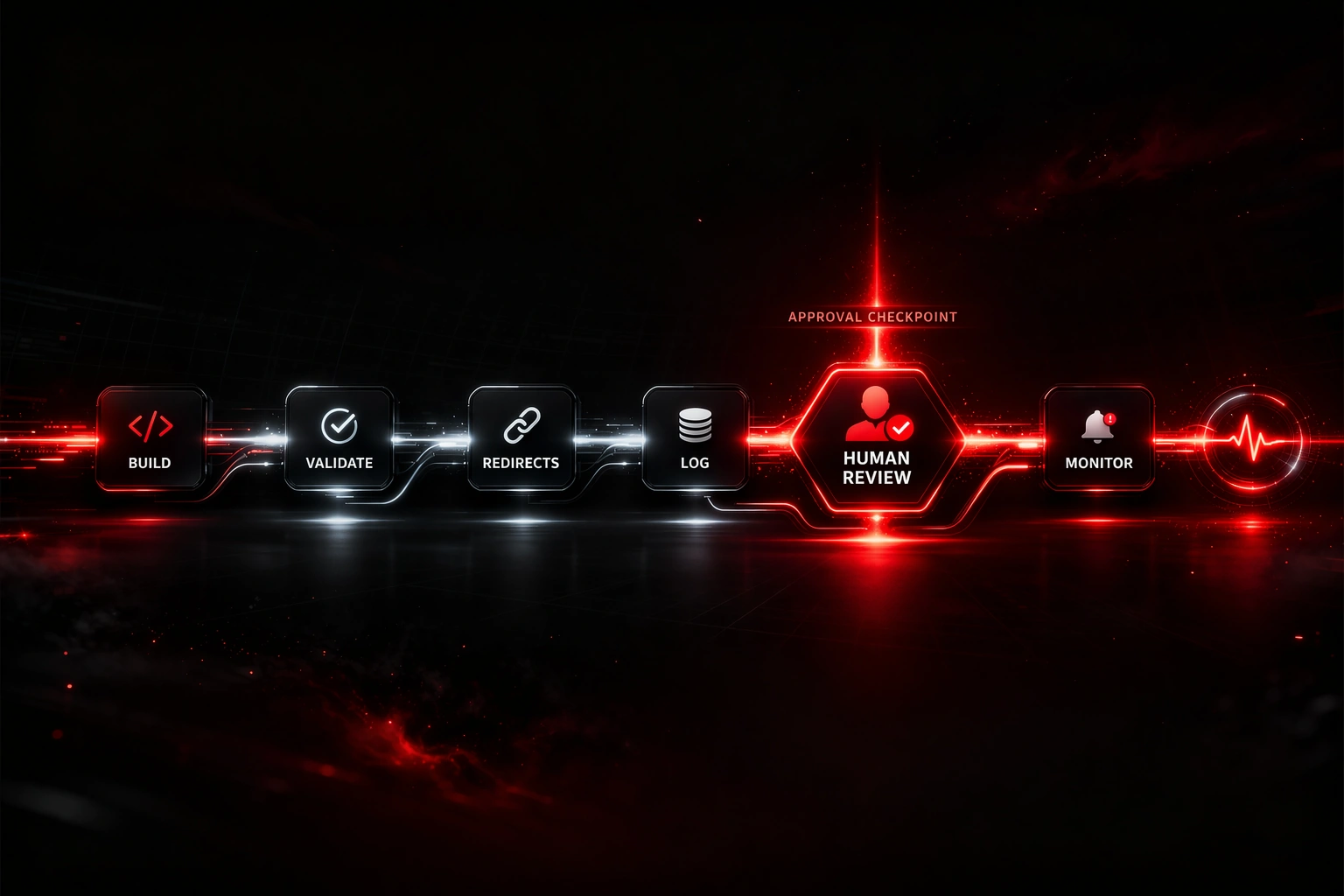
A premium automation layer does not replace the framework. It moves through it in order: build, validate, check routes, log actions, pause for approval where risk is real, then monitor after publish.
Build
Create tagged links from controlled templates, field rules, and approved naming logic.
Validate
Check syntax, duplicates, policy conflicts, and missing values before the asset moves onward.
Redirects
Run redirect integrity checks so chains, loops, and parameter loss get caught before publish.
Log
Record campaign IDs, route status, timestamps, and ownership so the workflow stays visible.
Human approval
Pause promotions, exceptions, and high-consequence changes until a real owner signs off.
Monitor
Keep drift, breakage, and missing outputs under watch after the asset goes live.
What belongs inside automation and what does not
The safest automation systems scale stable steps and protect the workflow from false confidence. Use the split below to decide where automation should help, where it should pause, and what should remain human-controlled.
Repeatable low-context steps
- UTM parameter formatting and template-driven builds
- Link building and logging against known defaults
- Redirect checking for chains, loops, and parameter pass-through
- QA validation for missing, duplicated, or malformed fields
- Scheduled reporting exports and alert delivery
Commercial or exception-heavy steps
- Campaign launches, promotions, and paid traffic handoffs
- Exception handling when the route or asset breaks pattern
- Manual approvals for live changes and high-value links
- Attribution investigations where multiple systems disagree
Strategy and meaning
- Context decisions around naming strategy and source-of-truth rules
- Attribution logic changes and consent interpretation
- Escalation handling when the workflow changes the decision
Common tracking automation failures
Most failures happen when speed gets added before the workflow is stable, visible, and reviewable. Use the pattern below to spot the real weakness faster, understand the risk, and apply the right fix before it spreads.
When the workflow debate turns into an architecture debate, push the team into server-side vs client-side tracking before anyone treats a collection rebuild as a shortcut around weak route QA or consent discipline.
Automating weak rules
Skipping validation
Hiding ownership
Confusing execution with quality
Automating exceptions
Logging too little
Never reviewing drift
Auto-completing reporting meaning
How to automate without losing control
Use automation to enforce workflow discipline, not to dodge the framework. These rules keep the system strong when execution scales.
Use the right tool at the right stage
Validate campaign links before they spread
Keep QA close to publish so missing fields, duplicate logic, and malformed values are caught early.
Once the manual workflow is stable, the next build layer is automate UTM creation so speed comes from governed defaults rather than copied chaos.
Open UTM QA Checker → See QA workflow automation →Check redirect behaviour before launch
When automation touches live links, route quality needs a real validation layer behind it.
Open Redirect Checker → Review redirect integrity →Clarify the rule set first
Build and validation work only when naming and governance rules are already consistent.
Go to UTM Tracking → Go to Link Governance →Do not automate reporting meaning
When the workflow is clean but the numbers still disagree, move into comparison and interpretation rather than pretending the workflow solved it.
Review Cross-Platform Attribution → Compare GA4 vs affiliate logic →Move to the framework page that matches the workflow problem
UTM Tracking
Use this when your naming rules, required fields, and campaign structure still need cleanup before the workflow can scale.
Go to UTM Tracking →Link Governance
Use this when approvals, ownership, retirement, and review status are still too weak for automation to be trusted.
Go to Link Governance →Redirect Integrity
Use this when automation touches live routing and you need stronger rules for chains, loops, and parameter survival.
Go to Redirect Integrity →Cross-Platform Attribution
Use this when the workflow is clean but the reporting still disagrees, and the issue has moved into interpretation.
Go to Cross-Platform Attribution →Tracking automation questions teams ask most
What should tracking automation handle first?
Start with repeatable low-context steps: UTM builds, QA validation, redirect checks, logging, and monitoring. Leave exceptions, strategy, and interpretation under human control.
Should automation publish without review?
Only when the workflow is genuinely low-risk and already governed. Promotions, live route changes, unusual naming, or unclear ownership should pause for approval.
Where does redirect validation belong?
Redirect checks belong before publish and again in monitoring. The workflow can test route behaviour, but redirect judgement still belongs to redirect integrity rules.
How does this fit the wider framework?
Tracking automation sits after naming, governance, and route rules exist. It scales governed execution; it should never replace the framework itself.
Reviewed by: Dean Downes, editor at Shortlinkfix. See our editorial policy and suggest a correction.