Why GA4 and Affiliate Data Disagree
If affiliate traffic is working but the numbers still fight each other, the problem is usually not “which dashboard is lying”. It is that GA4, the affiliate platform, and the live route are answering different questions at different scopes.
This page separates analytics truth, payout truth, and route truth so you can tell normal variance from real implementation failure without guessing.
Use it to read session classification, campaign readability, and source loss after the route has been validated.
Use the network for partner credit, click ID logic, de-duplication, and payout-ready conversion decisions.
If redirects, wrappers, or parameters fail, every dashboard after the route becomes harder to trust.
The fastest way to frame the disagreement
The goal is not to force every system to show the same number. The goal is to understand which layer owns the answer you actually need.
Three truths, three jobs
Analytics truth
GA4 answers campaign, session, landing-page, and source-readability questions.
Payout truth
The affiliate platform answers partner credit, de-duplication, and payout logic questions.
Route truth
The live URL path answers whether UTMs, click IDs, and redirects survived the journey cleanly.
What breaks teams
Most reporting fights happen when one system is asked to answer another system’s question.
If the route may be part of the problem, test it first with Redirect Checker and then validate the campaign parameters with UTM QA Checker.
Why the disagreement happens at all
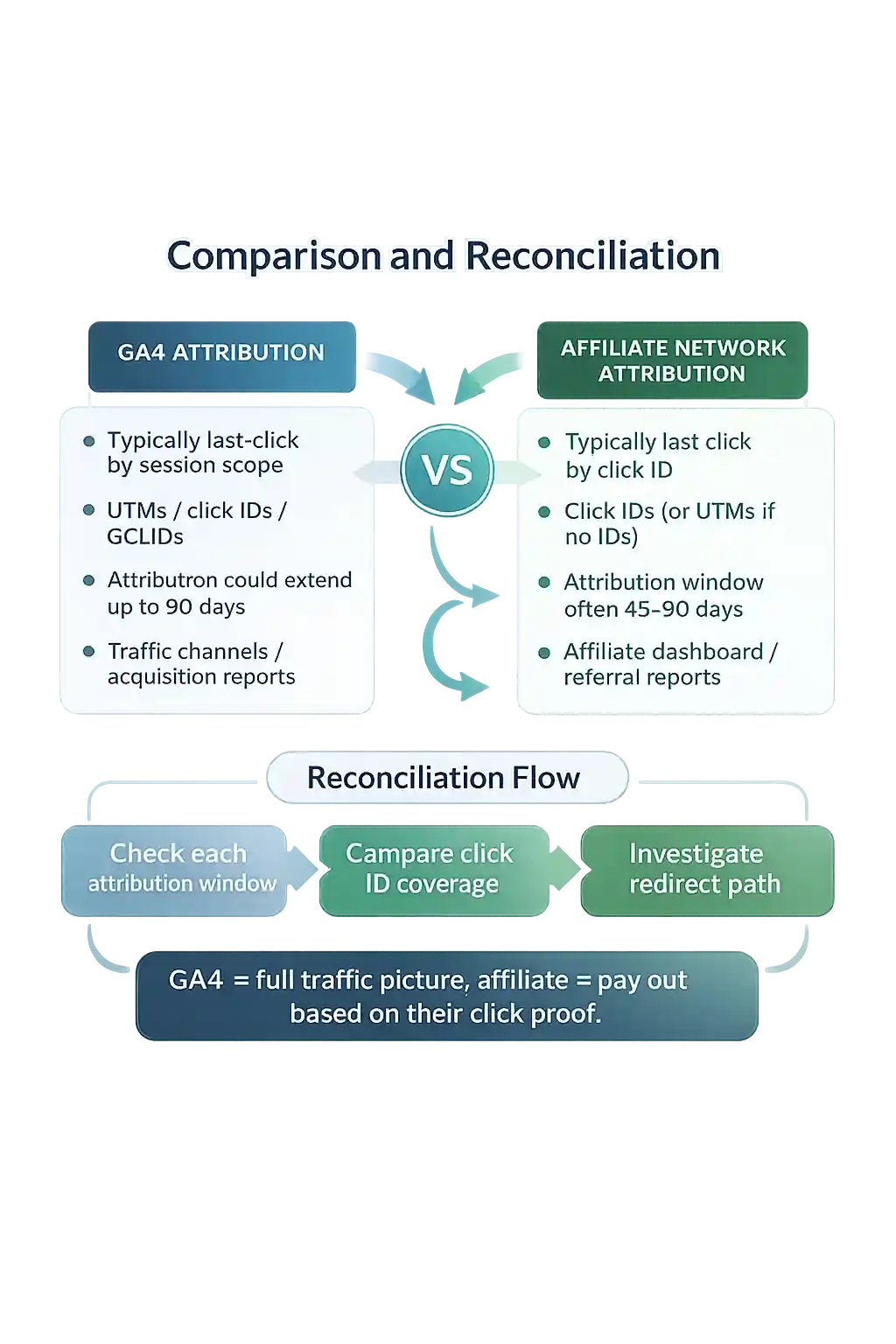
GA4 and affiliate platforms are built around different scopes, attribution rules, and business jobs. That difference is the root of the mismatch.
What Google’s own docs point to
Google documents that GA4 organises data by users, sessions, and events, and that each session is associated with only one campaign or traffic source. If a new campaign value appears mid-session, it can influence event attribution without creating a new session. That is one of the biggest reasons affiliate clicks can look under-credited in GA4 even when the partner touch itself was valid.
That means GA4 can remain technically correct while still failing to show the same view of the journey that the affiliate network uses for payout or partner credit.
What the networks point to
Awin and Rakuten both warn that affiliate data can look different in GA4 because the systems rely on different methodologies, scopes, and validation rules. An affiliate click that occurs late in the journey can still be valid for network credit even if it does not become a new affiliate session in GA4’s acquisition reporting.
Google Analytics Help: scopes of traffic-source dimensions · Campaigns and traffic sources · Awin · Rakuten
What each system is actually measuring
Use GA4 and the affiliate platform for different jobs, then compare them through the route rather than forcing them to match blindly.
GA4 leads for analytics truth
GA4 is strongest when you ask campaign and session questions.
- Which source / medium / campaign did the session land under?
- Where did the visitor actually land?
- Did the tagged route stay readable in acquisition reporting?
- Did the route collapse into (direct) / unassigned?
GA4 is weaker when you ask it to behave like a partner-payout engine. Report values depend on scope and attribution context, which is why the same journey can look different across acquisition and attribution views. Use Where UTMs Show in GA4 when you need the right report first.
Affiliate platforms lead for payout truth
The affiliate platform is usually closer to partner credit and payout logic.
- Partner payout and commission logic
- Click-ID credit and network-side validation
- Programme de-duplication and payout-ready conversions
- Acceptance or rejection under programme rules
That does not replace GA4. It means the network and GA4 should stop being asked to answer the same business question. If the network shows valid activity but GA4 looks weak, check the route, the UTMs, the report scope, and the attribution question before declaring the network wrong.
The six real causes of disagreement
These are the patterns that create most GA4 vs affiliate reporting fights in the real world.
Session scope and session-start rules
A valid affiliate touch can happen mid-session without becoming the session source you expected in a GA4 acquisition report.
Different report scopes inside GA4
Traffic Acquisition, event attribution, and model-comparison views are not reading the journey through the same scope.
UTMs or click IDs do not survive the route
Redirects, wrappers, or badly handled parameters can break attribution before either platform reports anything cleanly.
The team is comparing different signal types
Discount codes, click IDs, and UTM-tagged sessions are not interchangeable proof of the same thing.
If the argument is really about browser collection versus server-side forwarding, compare server-side vs client-side tracking before treating the mismatch as an affiliate or payout failure.
If the disagreement is really code data versus tagged-link data, settle that boundary with discount codes vs UTMs before you blame the platform.
The affiliate route is valid but commercially different
Loyalty, cashback, voucher, and lower-funnel publishers often create especially visible mismatches in GA4.
GA4 is being used to validate payout
Once GA4 is asked to approve or deny partner payment, teams end up arguing with the wrong system.
Normal mismatch vs real implementation failure
Not every discrepancy is an emergency. Use the pattern below to decide whether you are seeing normal variance or something that needs fixing.
| Pattern | Likely meaning | Concern level | Best next check |
|---|---|---|---|
| The affiliate platform shows more conversions than GA4 | Often normal when the network and GA4 use different scopes or attribution logic. | Usually normal variance first | Check report scope, model choice, and route QA. |
| GA4 shows affiliate traffic as direct / unassigned | Source loss or route failure is possible. | High concern | Redirect Checker + GA4 direct / unassigned |
| Affiliate clicks exist but the final URL loses UTMs or click IDs | The route is damaging the measurement layer. | High concern | UTM survival diagnosis + route check |
| Different GA4 reports tell different stories | Usually a scope or attribution-context issue inside GA4 itself. | Medium concern | Where UTMs show in GA4 |
| Discount code usage is high but affiliate clicks look low | The code spread outside the original click path or the wrong signals are being compared. | Usually a measurement-design issue | Codes vs UTMs vs IDs |
Which source of truth should lead for which question?
Force the question into the right layer first. That is how you stop endless reporting fights.
Partner payout
Lead with the affiliate platform. That is where click-ID credit, de-duplication, and partner payment logic live.
Readable campaign reporting
Lead with GA4 — but only after validating the route, the final destination, and the parameter layer.
Code usage at checkout
Lead with the commerce/code layer. A code proves code usage, not the whole click path.
Implementation diagnosis
Lead with the route and QA tools. If the link path is broken, every dashboard after it becomes harder to trust.
This is why Shortlinkfix keeps cross-platform attribution, signal ownership, and redirect integrity inside one operating model instead of treating them as random separate articles.
The practical reconciliation workflow
Run the diagnosis in this order so you do not waste time comparing the wrong layer first.
Define the question
Decide whether you are judging payout, reading campaign performance, or diagnosing source loss.
Check the live route
Test the publish URL with Redirect Checker before debating any dashboard output.
Use the network for payout truth
Do not ask GA4 to approve or deny a partner payment or rewrite network-side logic.
Document the result
Log the publish URL, final URL, owner, and route notes in the campaign tracking spreadsheet.
What to check first when the gap looks too large
If you cannot answer the points below, the disagreement is still under-diagnosed rather than mysterious.
The exact publish URL that the affiliate or creator used
The final landing URL after every redirect or wrapper
Whether UTMs survive to the landing page
Whether click IDs survive where they need to
Which GA4 report scope you are using
Whether the campaign value or medium is malformed
Whether the affiliate platform is showing raw tracked, validated, or payout-ready conversions
Whether the route changed recently through geo-routing, wrappers, or conditional redirects
Key supporting guides
Use these next when the disagreement turns out to be about route integrity, signal ownership, or GA4 reporting scope.
- UTMs for affiliatesKeep affiliate links readable in analytics without confusing payout logic with campaign logic.
- Discount codes vs UTMs vs affiliate IDsUse the right signal for the right business question instead of comparing incompatible evidence.
- Tracking IDs glossaryKnow what click IDs are for before you call them messy or strip them from the route.
- Where UTMs show in GA4Use the right GA4 view when the route itself looks clean but the report choice may be wrong.
- GA4 direct / unassignedUse this when the mismatch looks more like source loss than attribution nuance.
- Do redirects remove UTMs?Use this when the chain itself looks suspicious and parameter survival may be failing.
FAQ
These are the questions that usually sit underneath the argument once teams realise the systems are doing different jobs.
Why can GA4 show fewer affiliate conversions than the affiliate platform?
Because the systems are often measuring different things. GA4 session acquisition can classify an affiliate touch differently, while the affiliate platform can still record a valid click and partner credit for payout.
Does a mismatch automatically mean affiliate tracking is broken?
No. Some mismatch is normal. The real job is to separate expected scope and model differences from route, UTM, or implementation failures.
Which system should I trust for payout decisions?
Trust the affiliate platform for payout and partner credit. Use GA4 for campaign readability and route diagnosis after the link path has been validated.
Why can the same journey look different in different GA4 reports?
Because GA4 uses different scopes and attribution contexts across reports. A session-level acquisition view is not the same thing as an attribution-model view.
What should I check first if the gap suddenly gets worse?
Inspect the live route. If redirects, wrappers, or geo-routing changed, the parameter layer may be failing before the session ever becomes readable in GA4.
Sources
Current platform and network documentation for how GA4, tagging, and affiliate reporting behave.
- Google Analytics Help: scopes of traffic-source dimensions
- Google Analytics Help: campaigns and traffic sources
- Google Analytics Help: about traffic-source dimensions
- Google Ads Help: about auto-tagging
- Google Analytics Help: tag your Google Ads final URLs
- Awin: why affiliate data looks different in GA4
- Rakuten Advertising Help: internal analytics versus Rakuten reports
The workflow, diagnosis order, and source-of-truth rules on this page are Shortlinkfix methodology for keeping payout truth, campaign truth, and route truth separated by job.
Reviewed by: Dean Downes, editor at Shortlinkfix. See our editorial policy and suggest a correction.
Related reading: Cross-platform attribution · UTMs for affiliates · Discount codes vs UTMs · Tracking IDs glossary · Preserve click IDs · GA4 cross-domain attribution · Server-side vs client-side tracking